As an Amazon Associate this site earns from qualifying purchases.
Quick Picks: Manual Die-Cutting Machines With Verified Listing Data
| Machine | Stated opening / feed width | Listed kit contents | Link |
|---|---|---|---|
| Sizzix Sidekick Starter Kit 661770 Portable Manual Die Cutting & Embossing Machine for Arts & Crafts | 2.5 inch (6.35 cm) opening | Complete starter kit; listing points to the product description for the item list | Check Price on Amazon |
| Joelver Maker Manual Die Cutting Machine | 9 inch opening slot | 20+ steel dies, embossing folders and cutting pads | Check Price on Amazon |
| VEVOR Manual Die Cutting & Embossing Machine | 6 inch opening | Machine, cutting pads, A6 embossing folder, cutting die, A5 cardstock | Check Price on Amazon |
| CraftGenes Mini Die Cutting & Embossing Machine, 3.5-Inch Starter Kit | 3.5 inch feed slot, accepts paper up to 3 inches wide | 3 cutting plates, 3 embossing folders, 1 die set, 7 stamps, 10 cardstock sheets | Check Price on Amazon |
Disclosure: We earn a small commission from qualifying Amazon purchases at no extra cost to you.
As an Amazon Associate we earn from qualifying purchases. This page contains affiliate links, and we may receive a commission if you buy through them — at no extra cost to you.
As an Amazon Associate, we earn from qualifying purchases.
Last Updated: September 2026
Buying a craft cutting machine is one of those purchases where the marketing photos tell you almost nothing useful. Every listing shows a smiling person holding a perfectly weeded vinyl decal. None of them tell you the one number that actually decides whether your project fits: the opening or cutting width.
This guide fixes that. You will learn how the main machine categories differ mechanically, which published specifications genuinely predict what a machine can do, and where shoppers most often overspend or under-buy. This website does not do product research, so everything product-specific below is read directly from manufacturer and retailer listing data and attributed to it.
One scope note before we start, because it matters for how you read the recommendations. The verified product records supplied for this page cover manual die-cutting and embossing machines plus one Cricut guidebook. The educational sections on electronic cutters, print-then-cut and cutting width are written as buying criteria you can apply to any brand's spec sheet, not as claims about specific electronic machine models.
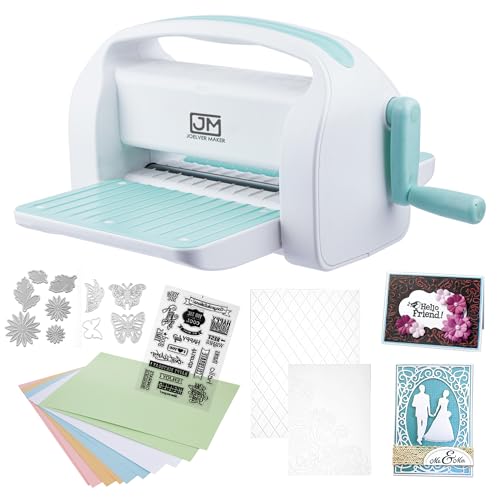
- Powerful Performer: The Joelver Maker manual die cutting and embossing machine is well made with a 9inch opening slot for scrapbooking, cardmaking and papercrafts, size perfect
- Full Scrapbooking set:Includes 20+ professional quality steel dies, embossing folders and cutting pads so you can get creative right out of the box
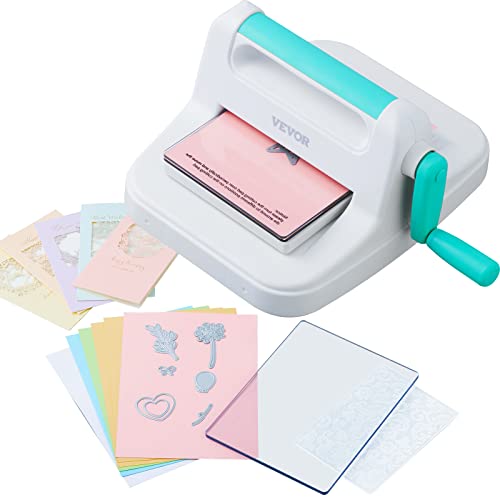
- Complete Starter Kit: Unleash your DIY potential with this all-in-one manual scrapbooking machine! It includes a die-cut machine, cutting pads, A6 embossed folder, cutting die
- Premium Metal Construction: Featuring a metal handle and steel roller system, this portable die-cutting and embossing machine delivers superior force and embossing pressure. It
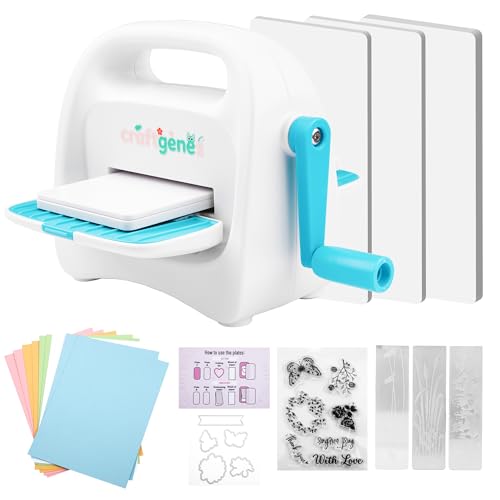
- Made for Small Paper Projects: The 3.5-inch feed slot accepts paper up to 3 inches wide, making this mini machine suitable for small die cuts, tags, card accents and scrapbook
- 24-Accessory Starter Kit: Includes 3 cutting plates, 3 embossing folders, 1 die set, 7 stamps and 10 cardstock sheets, plus the machine and instruction guide
What a Craft Cutting Machine Actually Is
A craft cutting machine is any device that cuts shapes from sheet material more precisely and repeatably than scissors or a craft knife.
They are not competitors so much as different tools. One reproduces a fixed shape you own. The other cuts any shape you can draw. Confusing the two is the single most expensive mistake in this category.
Types of Craft Cutting Machines Explained
| Type | How it cuts | Best suited to | What to verify before buying |
|---|---|---|---|
| Manual die-cutting and embossing machine | You sandwich a steel die and cardstock between plates and turn a crank; roller pressure forces the cut | Card making, scrapbooking, tags, paper embossing | Opening width, plate compatibility, which die brands and folder sizes fit |
| Mini manual machine | Same roller principle in a small body with a narrow feed slot | Small die cuts, card accents, travel and classroom use | Maximum paper width the slot accepts, material thickness limits |
| Electronic vinyl cutter | A motorised carriage steers a blade over a mat or feed roller under software control | Vinyl decals, iron-on lettering, custom SVG shapes | Maximum cutting width, mat-free vs mat-based, software and file format support |
| Print-then-cut capable electronic cutter | An optical sensor reads registration marks on a printed sheet so the blade follows the printed outline | Stickers, printed labels, planner art | Maximum print-then-cut sheet size, printer requirements, sensor lighting conditions |
| Heat press | Applies controlled heat and pressure to bond heat-transfer vinyl; it does not cut | Finishing garment projects made on a cutter | Platen size, temperature range and adjustable pressure |
Die Cutting vs Electronic Cutting Machine: The Real Difference
A manual die cutter can only make shapes you physically own as steel dies. An electronic cutter can make any shape in a supported digital file, but needs power, software and a computer or phone.
Here is the practical consequence. Manual machines have no firmware, no account, no subscription prompt and no connectivity to break. Joelver's listing states that the Joelver Maker Manual Die Cutting Machine,9" Openning, Scrapbooking Machine Starter kit runs by manual hand crank without needing batteries or electricity. The Sizzix Sidekick Starter Kit 661770 is identified in its verified title as a Portable Manual Die Cutting & Embossing Machine, so it is hand-operated rather than powered. The VEVOR Manual Die Cutting & Embossing Machine is likewise identified as a manual machine, and its listing describes a metal handle and steel roller system.
Electronic cutters buy you unlimited shape freedom and pay for it in setup complexity and ongoing software dependence. If your projects are cards, tags and embossed panels, the die route is often the honest answer. If you want name decals, custom shirt lettering or bespoke SVG designs, no amount of dies will get you there.
We cover the mechanical side in more depth in our manual die-cutting machine comparisons.
Cricut vs Silhouette vs Brother: How to Compare Them Without Guessing
The supplied product records for this page do not include electronic cutter models, so this section teaches the comparison method rather than declaring a winner between those brands.
When you put three electronic cutters side by side, only five spec lines change the outcome:
- Maximum cutting width and length. Width caps the widest single piece you can cut in one pass. Length caps how long a banner or decal can be before you split it.
- Downforce or cutting pressure, as the manufacturer states it. This determines what materials beyond vinyl and cardstock the machine can handle. Read the manufacturer's own material list rather than assuming.
- Software model. Check whether the design app is free, whether it requires an account, whether it opens SVG files without conversion, and whether it works offline.
- Mat requirement. Some machines need an adhesive carrier mat for every material; some feed roll material without one. Mats are consumables, which affects long-term cost.
- Tool ecosystem. Whether the carriage accepts scoring, pens, engraving or rotary tools decides how far the machine grows with you.
Print Then Cut Machines Explained
Print-then-cut is a workflow, not a blade type. You print a design on your own printer together with registration marks, load the printed sheet into the cutter, and an optical sensor locates those marks so the blade follows the printed outline.
The specification that matters is the maximum print-then-cut area, which is usually smaller than the machine's maximum cutting width. Sensor accuracy also depends on ambient lighting, paper whiteness and print contrast, so manufacturers publish material guidance for it. If custom stickers are your main goal, treat print-then-cut area as a hard requirement and check it on the manufacturer's spec page before anything else.
Manual die cutters cannot do this at all. A steel die has no idea where your printed artwork sits on the page.
Cutting Machine Cutting Width: The Spec That Decides Most Projects
Cutting width, or on a manual machine the opening width, is the ceiling on your project size. Everything else is negotiable; this is not.
Look at the range across the manual machines here. The Sizzix Sidekick Starter Kit 661770 lists a 2.5 inch (6.35 cm) opening. The CraftGenes Mini Die Cutting & Embossing Machine, 3.5-Inch Starter Kit states a 3.5-inch feed slot that accepts paper up to 3 inches wide. VEVOR states a 6 inch opening. Joelver states a 9 inch opening slot. That is a wide spread, and it maps directly onto what you can make.
A 3-inch usable width covers sentiment strips, tags and small floral accents. A 6-inch opening comfortably covers standard A6 folder work and card fronts. A 9-inch opening opens up full A2 card panels and larger background dies. Bigger is not automatically better, though, because opening width also drives storage footprint and the cost of the plates and dies you will buy later.
One caution worth stating plainly: an opening width is a width, not a thickness rating. It tells you nothing about how many layers of material a machine will cut in a pass. For that, read the manufacturer's material statement.
Key Features to Look For, Ranked by Importance
- Opening or cutting width. As above, this is the constraint you cannot design around.
- Stated material compatibility. Manufacturers publish what they intend the machine to cut. VEVOR's listing says its machine can handle a variety of materials, from paper and felt to leather, fabric, and metal, while CraftGenes states its mini machine is designed for standard 80 to 200 gsm cardstock and regular paper and is not suitable for extra-large die-cutting blades, laminated paper, or heavy-duty materials. Those are very different intended uses.
- Die and folder compatibility. A machine you cannot feed is a paperweight. Sizzix's listing states the Sidekick is compatible with Sizzix Thinlits dies, Framelits dies and embossing folders up to 6.35 cm wide, which is a clear, checkable boundary.
- What the kit actually includes. A starter kit that ships with plates, folders and a die set gets you cutting on day one. VEVOR lists a die-cut machine, cutting pads, A6 embossed folder, cutting die, and A5 cardstocks in the box.
- Stability during use. Roller machines want to walk across a desk. Sizzix's listing describes a vacuum seal that secures the machine to any smooth work surface for extra stability.
- Build materials in the drive train. VEVOR's listing describes a metal handle and steel roller system, and Joelver's describes durable steel construction. Both are manufacturer claims about construction, not independently verified durability results.
- Footprint and portability. Sizzix lists approximate dimensions of 7 3/4 by 4 3/4 by 3 1/2 inches and a weight of 0.7 kg. CraftGenes lists a 5.9 by 5.9 by 3.15 inch body with built-in compartments for dies and small tools and a top handle.
- Consumable strategy. Cutting plates and mats wear out. CraftGenes explicitly advises rotating and flipping the cutting mat to distribute wear evenly, which tells you plates are a recurring cost on any roller machine.
Common Mistakes to Avoid
- Buying an electronic cutter for work a die machine does better. If your output is cards and embossed panels, a crank machine involves no software at all.
- Buying a mini machine as your only machine. A 3-inch usable width, as CraftGenes states for its feed slot, is a deliberate design choice for small accents, not a compromise version of a full-size machine.
- Assuming any die fits any machine. Compatibility is stated per machine and per die line, and Sizzix publishes its supported die families explicitly.
- Treating an opening width as a material capability. Width and thickness are separate specs.
- Forgetting the finishing tool. Heat-transfer vinyl projects need a heat press or iron with real, even pressure. Budget for it up front and see our heat press buying guide.
- Ignoring plate and mat replacement. These are wear items on every roller machine.
- Buying on brand recognition instead of the spec sheet. Pull the numbers, compare like with like, decide after.
Budget Considerations
Prices move constantly, so use criteria rather than a price ladder. Check current price on Amazon for any machine you shortlist, then judge it against these four questions.
First, what is the cost per usable inch of opening? A wider machine that you will actually use for large panels is better value than a narrow one you outgrow in a month. Second, how much of your first year of supplies is already in the box? Joelver's listing states 20+ steel dies, embossing folders and cutting pads, and CraftGenes states a 24-accessory kit including 3 cutting plates, 3 embossing folders, 1 die set, 7 stamps and 10 cardstock sheets. Those inclusions offset real spending.
Third, what will consumables cost? Cutting plates, mats and blades are the ongoing line item. Fourth, is there a subscription or account requirement in the software path? Manual machines have none.
And if you are shopping for someone else, remember that returns and refund rights are worth understanding before you buy; USA.gov publishes general consumer protection guidance for shoppers.
Our Top Recommendations
Joelver Maker Manual Die Cutting Machine — Best for full-size card panels on a hand crank
This is the widest opening among the manual machines in this guide: Joelver's listing states a 9 inch opening slot, which the brand describes as suiting most sizes of embossing folder and die cuts on the market. If you are cutting full card fronts and background panels rather than small accents, that width is the reason to look here.
The listing also states the kit includes 20+ professional quality steel dies, embossing folders and cutting pads, plus a foldable and portable design and manual hand crank operation that needs no batteries or electricity.
Strengths
- Widest stated opening of the manual machines covered here at 9 inches
- Substantial included die and folder set, so you can start immediately
- No power requirement, which makes it usable anywhere with table space
- The supplied listing information does not state machine dimensions or weight, so confirm the storage footprint before buying if shelf space is tight
- "20+" is a floor, not an itemised inventory; the exact die designs are not enumerated in the supplied record
VEVOR Manual Die Cutting & Embossing Machine — Best for crafters wanting a broad stated material range
VEVOR's listing states a 6 inch opening and compatibility with any standard 6-inch embossing folders, texture plates, and rule dies. That is the sweet spot for A6 folder work and standard card fronts.
What stands out in the published specification is material breadth. The listing says the machine can handle a variety of materials, from paper and felt to leather, fabric, and metal, and describes a metal handle and steel roller system delivering pressure through multiple layers in a single pass. Read that as the manufacturer's intended use statement rather than a verified performance result, and confirm die ratings for any tough material before you cut.
Strengths
- Broad manufacturer-stated material list extending beyond paper to felt, leather, fabric and metal
- Complete starter kit listed: machine, cutting pads, A6 embossing folder, cutting die and A5 cardstock
- Metal handle and steel roller system per the listing, with a compact build the brand says stores easily
- The supplied listing information does not state a maximum material thickness figure, so the material list alone will not tell you how thick a leather or metal sheet can be
- A 6 inch opening will not take oversized background dies
Sizzix Sidekick Starter Kit 661770 Portable Manual Die Cutting & Embossing Machine for Arts & Crafts — Best for travel and known die-line compatibility
Here is the thing about Sizzix: the compatibility statement is unusually specific. The listing says the Sidekick works with Sizzix Thinlits dies, Framelits dies and embossing folders up to 6.35 cm wide, and adds that small and medium Sizzlits and Sizzlits Decorative Strips can also be used for die-cutting. When you buy dies later, that removes guesswork.
The trade-off is size. Sizzix states a 2.5 inch (6.35 cm) opening, approximate dimensions of 7 3/4 by 4 3/4 by 3 1/2 inches and a weight of 0.7 kg. The listing describes the machine as portable and says it will cut a single sheet of lightweight cardstock to paper. A vacuum seal, per the listing, secures it to any smooth work surface.
Strengths
- Explicit named die-line compatibility, which simplifies future die shopping
- Light and small per the published dimensions and 0.7 kg weight, suited to crops and classes
- Vacuum seal for stability on smooth surfaces
- The 2.5 inch opening restricts you to narrow dies and folders
- The listing describes cutting a single sheet of lightweight cardstock to paper, so treat heavier stacks as outside its stated scope
- The kit contents are referred to the product description rather than itemised in the supplied feature bullets
CraftGenes Mini Die Cutting & Embossing Machine, 3.5-Inch Starter Kit — Best for small accents and honest expectation setting
CraftGenes publishes the most candid specification set of the group, and that is a compliment. The listing states a 3.5-inch feed slot that accepts paper up to 3 inches wide and positions the machine for small die cuts, tags, card accents and scrapbook details.
It also states what the machine is not for: designed for small, thin metal die-cutting blades, standard 80 to 200 gsm cardstock and regular paper, and not suitable for extra-large die-cutting blades, laminated paper, or heavy-duty materials. The kit is listed as 24 accessories including 3 cutting plates, 3 embossing folders, 1 die set, 7 stamps and 10 cardstock sheets, in a 5.9 by 5.9 by 3.15 inch body with built-in compartments and a top handle.
Strengths
- Clear, specific material window stated in gsm rather than vague marketing language
- Well-stocked 24-accessory kit for the size, including stamps and cardstock
- Built-in storage compartments and a top handle, which suits a shared or shifting workspace
- A 3 inch usable paper width rules out full card panels
- The manufacturer explicitly excludes laminated paper, heavy-duty materials and extra-large dies
A Learning Resource, Not a Machine
If your decision is leaning toward an electronic cutter, the learning curve sits in the software, not the hardware.
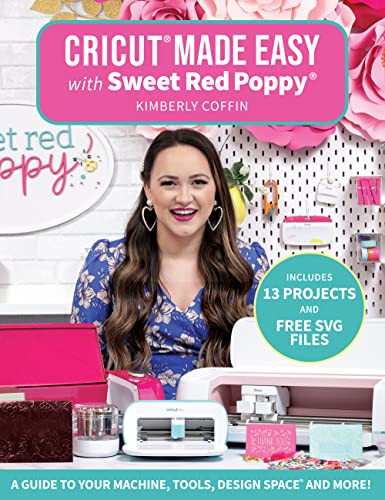
To be completely clear: this is a book, not a cutting machine, and buying it does not get you hardware. It is worth knowing about if you want to understand the Design Space workflow before committing to a machine purchase. Check Price on Amazon
How to Get the Best Deal on Amazon
- Shortlist on specification first, then compare current offers. Opening width and material compatibility do not change when a price does.
- Value the bundle honestly. Count the plates, folders and dies a kit includes against what you would otherwise buy separately.
- Check the seller and whether the listing is the machine itself rather than an accessory or a replacement plate set.
- Read the feature bullets for exclusions, not just inclusions. The most useful sentence in a listing is often the one telling you what the machine will not cut.
- Before purchase, check for any published recall notices on CPSC's website for the brand or product category.
Maintenance & Care Tips
Roller machines are simple, which is exactly why the small habits matter.
Rotate and flip your cutting plates. CraftGenes advises rotating and flipping the cutting mat to distribute wear evenly, and the same principle applies to any plate sandwich: cutting in the same track repeatedly grooves the plate and produces incomplete cuts.
Build the sandwich the manufacturer specifies. CraftGenes describes the process as building the recommended plate sandwich, placing the cutting edge toward the cardstock, inserting the stack and turning the handle. Forcing a non-standard stack is how rollers and handles get damaged.
Respect the stated material window. If a manufacturer publishes a gsm range or excludes laminated stock, that boundary exists because of the pressure the rollers apply.
Store plates flat, keep dies dry to avoid rust on steel edges, and secure the machine before cranking. If your model offers a vacuum seal or clamp, use it on a smooth surface as intended.
How We Research
This website does not perform product research, and it runs no lab. For this guide, the process was documentary: each product was pulled as an Amazon Creators API verified product record, retrieved 2026-09-09, and every specific number quoted above comes from that record's product listing feature bullets.
We read those bullets closely for the specs that actually predict use, opening width, stated material range, die compatibility, kit contents and published dimensions, then reasoned about what each figure implies for a buyer. Where a listing does not state something, we say so rather than filling the gap. Marketing adjectives like "powerful" and "premium" were treated as manufacturer claims, not findings.
Final Verdict
Decide the mechanism before the brand. If your projects are cards, tags, embossed panels and layered paper shapes, a manual die-cutting machine gives you a cleaner tool with no software, no account and nothing to update.
Of the manual machines with verified listing records here, the Joelver Maker Manual Die Cutting Machine is the one I would put in front of a serious card maker, because its stated 9 inch opening slot is the widest of the manual machines covered here, and its listed 20+ dies, folders and cutting pads make it usable immediately. For mixed-media work, the VEVOR Manual Die Cutting & Embossing Machine earns its place on its stated 6 inch opening plus a manufacturer material list that extends from paper and felt to leather, fabric and metal. If you already own Sizzix dies or want a machine to carry to crops and classes, the Sizzix Sidekick Starter Kit 661770's published approximate dimensions of 7 3/4 by 4 3/4 by 3 1/2 inches, its 0.7 kg weight and its explicit Thinlits, Framelits and Sizzlits compatibility make it a sensible choice. And for small accents or a beginner, the CraftGenes Mini Die Cutting & Embossing Machine, 3.5-Inch Starter Kit states its limits plainly, a 3.5-inch feed slot accepting paper up to 3 inches wide and standard 80 to 200 gsm cardstock, so you can check before buying whether it matches your projects.
If you need custom text, unique SVG shapes or print-then-cut stickers, none of these will do it, and no die collection will substitute. In that case, apply the five-spec comparison method above to Cricut, Silhouette and Brother spec sheets directly, and pair whatever you choose with an appropriate heat press for garment work.
Frequently Asked Questions
No. A manual die-cutting machine presses a physical steel die through material using roller pressure and a hand crank, so it can only make shapes you own as dies. An electronic cutter steers a blade along a digital path under software control, so it can cut any supported design file. They solve different problems.
What cutting width do I actually need?
Match it to your largest routine project, not your largest imagined one. In this guide's manual machines the published openings range from the 2.5 inch (6.35 cm) opening stated for the Sizzix Sidekick Starter Kit 661770 to the 9 inch opening slot stated for the Joelver Maker Manual Die Cutting Machine, which is a large difference in the size of die and folder you can feed.
Can a manual die cutter cut vinyl for shirts?
Not in the way an electronic cutter does. A die cutter reproduces the shape of the die you feed it, so custom lettering and names are outside its scope. Check each manufacturer's stated material list: VEVOR, for instance, states its machine handles materials from paper and felt to leather, fabric, and metal, but that is a die-cut material list, not custom text capability.
Do I need a heat press as well?
Only if you are applying heat-transfer vinyl to fabric. A cutting machine cuts the design; the press bonds it. If garment work is your goal, budget for both from the start.
What is print then cut, in plain terms?
You print your artwork with registration marks on your own printer, then the cutting machine's optical sensor finds those marks and cuts precisely around the printed design. It is how custom stickers are made. Manual die-cutting machines cannot do it.
Are starter kits worth it or just filler?
They save real money when the contents are itemised. CraftGenes lists 3 cutting plates, 3 embossing folders, 1 die set, 7 stamps and 10 cardstock sheets, and Joelver lists 20+ steel dies, embossing folders and cutting pads. Cutting plates in particular are consumables you will buy again regardless.
How long do cutting plates last?
The supplied listing information does not state a plate lifespan for any of these machines. What manufacturers do advise is wear management: CraftGenes recommends rotating and flipping the cutting mat to distribute wear evenly, which implies plates are expected to degrade with repeated use in the same track.
Sources & Methodology
Nobody at this website cut a single sheet of cardstock for this article. There was no bench, no stopwatch and no lab, and any page claiming otherwise about these machines should be read sceptically.
What was done instead: each of the machines and the guidebook named here was retrieved as an Amazon Creators API verified product record on 2026-09-09, and the specifications quoted, opening widths, kit inventories, stated material ranges, die compatibility and published dimensions, were taken from those listings' own feature bullets and attributed to the manufacturer or seller who published them.
For manual die-cutting machines, that documentary approach gets a buyer further than it would in most categories, because the deciding variables are geometric and published: how wide the opening is, which dies and folders fit, what paper weight the maker intends. It cannot tell you how a crank feels after a hundred cuts or how a plate ages, and this guide does not pretend to.