As an Amazon Associate this site earns from qualifying purchases.
Quick Picks
| Press (exact listing name) | Manufacturer-stated temp range | Manufacturer-stated power | Notable control feature | Link |
|---|---|---|---|---|
| Fancierstudio Digital Heat Press 15 x 15 Sublimation Rhinestone Heat T-Shirt Machine15x15 B/BLK | 0-699 degrees F | 1800 watts | Adjustable pressure, electronic time and heat control | Check Price on Amazon |
| PowerPress Industrial-Quality Digital Sublimation Heat Press Machine for T Shirt, 15x15 Inch, Black | 32-455 F | 1400 W | Patented control chip, replaceable fuse, removable silicon mat | Check Price on Amazon |
| RoyalPress 15" x 15" Color LED Industrial-Quality Digital Sublimation Heat Transfer Machine T-Shirt Heat Press Machine | 0-480F | 1400W | Color LED memory controller with time, temp and 0-999pcs counter | Check Price on Amazon |
Disclosure: We earn a small commission from qualifying Amazon purchases at no extra cost to you.
As an Amazon Associate we earn from qualifying purchases. This page contains affiliate links, and we may receive a commission if you buy through them — at no extra cost to you.
As an Amazon Associate, we earn from qualifying purchases.
Last Updated: September 2026
Faded sublimation almost always comes down to one of four things: not enough heat at the platen, not enough time, not enough pressure, or a substrate that was never sublimation-ready in the first place. Ghosting and blurring are a separate failure — the transfer paper moved against the blank while the dye was still gassing, or it moved as you lifted the press. Fix the heat/time/pressure triangle first, then lock the paper down. That order matters, because a shifting transfer on a cold press just gives you a blurry pale print instead of a blurry saturated one.
Here's the thing: sublimation is not ink sitting on fabric. It's dye turning to gas and bonding into polyester. If the polymer never opens up, the color never goes in, and you get that washed-out pastel version of the file you printed.
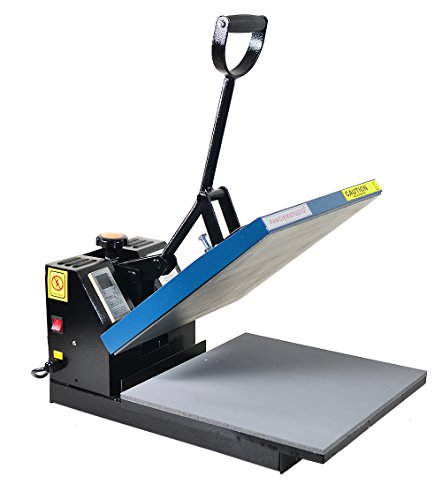
- Brand new 15-by-15-inch heat press sheet included
- Voltage: 110 volts; Power: 1800 watts
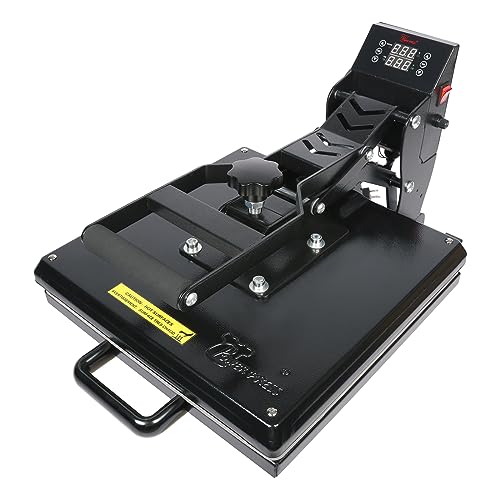
- Teflon coated Heating Plate: 15x15 inch. Voltage: 110V. Power: 1400 W. Digital Control Board (Temperature Range: 32-455 F & Time Range: 0-999 s)
- Removable Silicon Mat: The silicon mat is not glued on the bottom board. Advantages: Washable (Easy to clean after work) & Replaceable (Easy to replace with new mat). Please feel
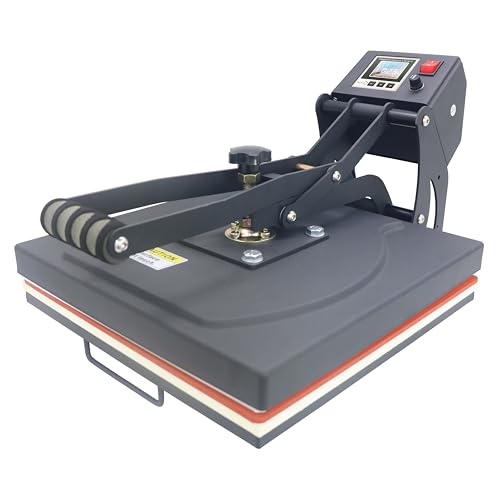
- Brand New Industrial-Quality Press-casting aluminum heating plate with teflon coating,don't need coated sheet anymore;Printing Area:15" x 15" (38 x 38cm)
- Temperature range:0-480F Fahrenheit degree(0-250 Centigrade),Time Range:0-999 second, Counter Range:0-999pcs; Voltage:110v, Power:1400W; With US-standard grounded plug
The Problem: What Faded, Ghosted and Blurry Actually Mean
These are three different symptoms with three different root causes, and treating them as one problem is why people chase their tail for weeks.
Faded / dull colors. The image transferred, but at low saturation. That points to under-heating, under-timing, weak pressure, or a low polyester count in the blank. A 50/50 cotton-poly tee will never look like a 100% poly performance shirt, no matter what you do to the press.
Ghosting. A faint duplicate of your image offset from the main print. The paper lifted and resettled — usually during the press opening, sometimes as you pulled the shirt off while it was still hot and gassing.
Blurry / soft edges. Micro-movement during the press cycle, moisture in the blank steaming under the paper, or excessive time at temperature letting the dye spread.
Step-by-Step Solution
- Verify your platen is actually reaching temperature. Digital displays report the setpoint, not always what the plate delivers at the corners. If one corner of your prints is consistently pale, that's a heat distribution problem, not a settings problem.
- Confirm the blank is high-polyester and sublimation-coated. Cotton takes dye and releases it in the wash. Poly count is the ceiling on your saturation, full stop.
- Pre-press the blank for a few seconds. This drives out moisture and flattens seams. Moisture is a top cause of blurry, blotchy transfers.
- Lint-roll, then tape the transfer down with heat-resistant tape on at least two opposite edges. This is the single highest-leverage fix for ghosting.
- Set your pressure by the manufacturer's guidance for your press and blank thickness, then press without bumping the machine.
- Open the press cleanly and lift the paper in one motion, away from the garment — don't peel slowly, don't let it flop back down.
- Change one variable at a time on a test blank. Time, then temperature, then pressure. Changing all three at once teaches you nothing.
Tools and Products You'll Need
Beyond tape, a lint roller and a butcher-paper barrier, the press itself is the variable you can't work around. If your machine can't hold a stable setpoint or your pressure isn't adjustable, you'll keep guessing.
Recommended Products
Three presses in the supplied listing data are 15x15-inch sublimation-marketed machines, and their published specs differ in ways that matter for the fade/ghost problem.
Fancierstudio Digital Heat Press 15 x 15 Sublimation Rhinestone Heat T-Shirt Machine15x15 B/BLK — Best for crafters who want adjustable pressure plus headroom above typical sublimation temps
The listing states a temperature range of 0-699 degrees F, a time range of 0-999 s, and 1800 watts at 110 volts. That wattage is the highest of the three presses in this supplied data set, which is a reasonable inference toward faster recovery between pressings — though the listing does not publish a recovery-time or duty-cycle figure, so treat that as an expectation, not a promise.
Crucially for fade problems, the listing calls out that pressure is adjustable, alongside a silicon-gel base board and Teflon coating on the heat platen. A heat press sheet is included per the listing.
Strengths: adjustable pressure, the widest published temperature ceiling here, electronic time and heat control.
Limitations to know: the supplied listing information does not state platen temperature uniformity, warranty length, or whether the pressure adjustment is calibrated in any unit. A 699 F ceiling is far above normal sublimation settings, so the range itself isn't the selling point — the control is.
PowerPress Industrial-Quality Digital Sublimation Heat Press Machine for T Shirt, 15x15 Inch, Black — Best for people whose blurring comes from a dirty or contaminated bottom pad
The removable silicon mat is the standout here. The listing says the mat is not glued to the bottom board, making it washable and replaceable. If you've had a bleed-through or a lint-embedded pad wrecking your surface contact, being able to strip and swap it is a genuine maintenance advantage over a bonded pad.
Published specs: Teflon coated 15x15-inch heating plate, 110V, 1400 W, digital control board with a 32-455 F temperature range and 0-999 s timer. The seller also describes a patented control board chip as making temperature control more accurate and safer, and a replaceable fuse for overheat and short protection. That is the seller's claim, not independent certification — no third-party verification appears in the supplied listing information.
One honest note from the listing itself: it says the machine's shape may change slightly when the plate is closed at high temperature, which is why a bottom handle is included to help open it. That's the manufacturer describing thermal movement in its own product, and it's worth knowing before you buy.
Limitations to know: the 455 F published ceiling is the lowest of the three here. For standard sublimation that's ample, but it leaves less margin than the other two. No pressure-adjustment mechanism is described in the supplied bullets.
RoyalPress 15" x 15" Color LED Industrial-Quality Digital Sublimation Heat Transfer Machine T-Shirt Heat Press Machine — Best for batch runs where consistency across many pieces is the goal
This one's controller does more. The listing describes a Color LED intelligent memory digital controller with triple function — temperature, time and a counter with a 0-999pcs range — explicitly for calculating production. If you're pressing an order of 60 shirts, a memory setpoint plus a piece counter is a real workflow feature, not marketing garnish.
On the fade question, the listing highlights a press-cast, specially thickened aluminum heating plate with Teflon coating, which the seller says makes temperature even and stable across the plate. Uneven platen heat is a leading cause of one-corner fading, so a thickened plate claim is relevant — but note it is the seller's description, and the supplied listing information publishes no uniformity measurement in degrees.
Published specs: 0-480F (0-250 C), 0-999 second timer, 110v, 1400W, US-standard grounded plug, 15" x 15" printing area. The listing also says a coated sheet is no longer needed thanks to the Teflon coating, and that t-shirts are not included.
Limitations to know: no adjustable-pressure claim appears in the supplied bullets for this model, and no warranty term is stated.
Tips for Best Results
- Print a test grid, not a test image. Solid blocks of red, black, and a light gradient reveal fade faster than artwork does.
- Log every press. Blank type, temp, time, pressure setting. Two weeks of notes beats two months of guessing.
- Keep the platen clean. Residue on Teflon transfers to the next shirt and softens edges.
- Don't stack blanks to save time. Two shirts in the press means neither gets full contact pressure.
- Let the press fully recover to setpoint between pieces rather than pressing the moment the display flickers back.
Common Mistakes to Avoid
- Blaming the printer when the blank is the problem. Low polyester content caps your color.
- Skipping the pre-press. Moisture ruins more transfers than bad ink ever will.
- Taping only one edge. The untaped side is the one that walks and ghosts.
- Peeling the transfer slowly while hot.
- Cranking temperature to compensate for weak pressure. That scorches poly and yellows the shirt.
How We Research
This site does not do product research. For this guide, every product specification was read from the Amazon Creators API verified product record and the product listing feature bullets for each of the three ASINs, retrieved 2026-09-09. We compare published figures against each other — wattage, temperature range, timer range, controller features — and explain what those figures plausibly mean for someone fighting faded or ghosted transfers. Where a listing does not publish something, such as platen uniformity in degrees or warranty length, we say so rather than filling the gap.
Final Verdict
If your problem is faded color and you want the most control over the variable that fixes it, the Fancierstudio Digital Heat Press 15 x 15 Sublimation Rhinestone Heat T-Shirt Machine15x15 B/BLK is the one to look at — it's the only press in this set whose listing states adjustable pressure, and pressure is the fix people neglect most. Check Price on Amazon
If you're running volume and want repeatability, the RoyalPress memory controller with its 0-999pcs counter is built for exactly that workflow. And if a filthy, permanently bonded bottom pad is what's blurring your prints, the PowerPress removable, washable silicon mat solves a specific, annoying problem the other two listings don't describe.
None of these listings publish a temperature-uniformity spec, so if perfectly even platen heat is your make-or-break requirement, ask the manufacturer directly before ordering.
Related Resources
- How to set heat press pressure correctly
- Choosing sublimation blanks by polyester content
- Heat press vs. Cricut EasyPress for beginners
- For general product safety and recall information, see the CPSC, and for consumer purchase protections, USA.gov consumer protection.
Sources & Methodology
Nobody here pressed a shirt. This page was built by reading the Amazon Creators API verified product records and the product listing feature bullets for ASINs B0043H9FMU, B0773Y1TNX and B081RNTHTK as retrieved on 2026-09-09, then reasoning about what those published temperature ranges, wattages, controller descriptions and platen constructions imply for the specific failure modes of faded and ghosted sublimation. Spec reading gets you a long way in this category, because the settings triangle is mechanical and the numbers are published — but it cannot tell you how evenly a given plate actually heats, and no supplied listing puts a figure on that, so treat platen uniformity as the open question and confirm it with the seller.