As an Amazon Associate this site earns from qualifying purchases.
Quick Picks
| Product | Best for | Published control range |
|---|---|---|
| VEVOR Hat Heat Press Machine | Curved caps and small odd-shaped items | VEVOR lists 32-449℉ / 0-232℃ and 1-999 seconds |
| VEVOR Tumbler Heat Press Machine | Sublimation on 11-40 oz drinkware | VEVOR lists 32°F–428°F / 0–220°C and 0–999 seconds |
| FSYGUTOU HEATPRESS Thermostat with Timer and Counter Function LCD | Replacing or upgrading a press controller (a component, not a press) | Listing describes a PID controller with timer, counter and time alarm |
Disclosure: We earn a small commission from qualifying Amazon purchases at no extra cost to you.
As an Amazon Associate, we earn from qualifying purchases.Last Updated: September 2026
The short answer: correct heat press temperature and time settings do not come from the press. They come from the material you are pressing. Your HTV or sublimation supplier publishes a temperature, a dwell time and a pressure description for that specific film, ink and blank combination — your job is to make the press hold those numbers, and to confirm the press can reach them at all before you buy it.
That last part is where most beginners get burned. A press with a ceiling below what your transfer needs is not a settings problem. It is a hardware problem.
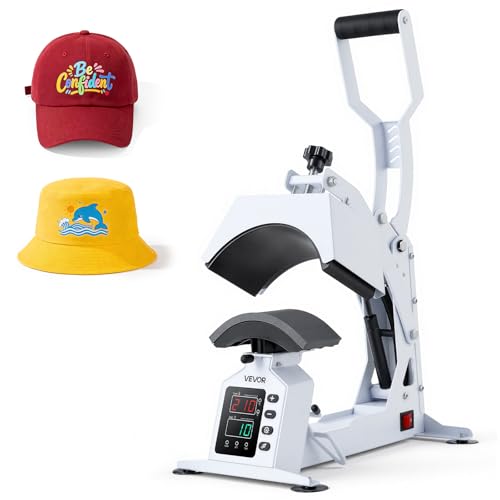
- Precision LED Temp & Time Control: Set 32-449℉ / 0-232℃ and 1-999s with countdown alerts for consistent, accurate transfers. This hat heat press machine reduces misprints, boosts
- Dual Heating + 580W Fast Performance: Dual heating tubes and a PTFE-coated plate on this hat press heat machine for caps deliver faster warm-up, even heat distribution, and
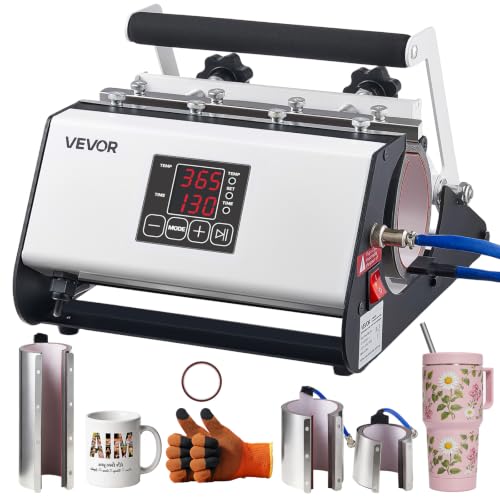
- Fits 11–40 oz Cups: This tumbler heat press machine includes 30 oz and 40 oz heating attachments, making it suitable for ceramic mugs, stainless steel tumblers, glass cups and
- Fast & Even Heating: With NTC temperature sensing, this tumbler press preheats in just 1 minute to shorten waiting time. Even heating helps deliver clear, sharp transfer results
The Real Problem: There Is No Universal Settings Chart
Here is the thing. "Heat press temperature and time settings" gets searched as if one chart covers everything, but a single number cannot be right for glitter HTV, stretch HTV, a polyester tumbler and a cotton tote at once. Temperature, dwell time and pressure interact — drop one and you usually have to raise another, and past a certain point you scorch the substrate instead of bonding to it.
So treat any chart you find online, including one printed in a machine's manual, as a starting point rather than gospel. VEVOR's tumbler press listing says the manual provides clear operating instructions and suggested temperature and time settings, which is genuinely useful for drinkware — but it is the machine maker's suggestion, not the ink maker's specification.
Step-by-Step: How to Use a Heat Press Machine Correctly
- Pull the material spec sheet first. Find the exact HTV line or sublimation blank you bought and write down its stated temperature, time, pressure description and peel method (hot, warm or cold).
- Confirm your press can hit that number. Compare the requirement against the machine's published range. VEVOR publishes 32-449℉ / 0-232℃ for the hat press and 32°F–428°F / 0–220°C for the tumbler press, so the hat press has roughly 21°F more headroom on paper.
- Preheat fully, then wait longer. A display reading the target does not mean the whole platen is stable at target. Give it a few extra minutes after the readout settles.
- Pre-press the blank. A short press with nothing on it drives out moisture and flattens the surface. Moisture is a common cause of lifting edges on cotton.
- Position and secure the transfer. Heat-resistant tape stops sublimation transfers shifting; the VEVOR tumbler press ships with tape and gloves in the box.
- Set the timer, not a phone. Use the machine's countdown. VEVOR lists 1-999 seconds on the hat press with countdown alerts, and 0–999 seconds on the tumbler press.
- Apply the pressure your material calls for, close, and do not open early to peek.
- Peel exactly as specified. Hot peel and cold peel films behave completely differently; guessing here ruins otherwise perfect presses.
- Test on a scrap blank before a paid order. Always. Every time you change film, blank supplier or machine.
Heat Press Pressure Settings, Explained
Pressure is the setting the supplied listings for these two VEVOR machines do not state in numbers. On the VEVOR hat press, the supplied listing information does not state a numeric pressure or psi value; instead it describes the hardware that manages pressure — a cap stretcher to avoid misalignment, platen covers to reduce marks, a gas spring for smooth pressure, and four suction feet for stable, slip-resistant pressing.
Read that as a design philosophy: on curved surfaces, even contact matters more than raw force. If a cap is not stretched flat and centred, no amount of clamping pressure fixes the resulting half-pressed logo.
For drinkware, pressure is set by the attachment fit.
Tools and Products You'll Need
VEVOR Hat Heat Press Machine — Best for curved caps and small awkward blanks
Flat presses fight curved brims. This one is built specifically for them: VEVOR lists an 8.5 x 4 in heating plate, and the listing names cotton, polyester and canvas among supported materials, with hats, headbands, pet apparel, tote bags and masks among the intended items.
On the heating side, VEVOR describes dual heating tubes, a PTFE-coated plate and 580W, which the brand credits for faster warm-up and even heat distribution. Even heat is the whole ballgame for consistent dwell times — a cold corner means one side of your logo gets a shorter effective press than the timer says.
Safety-wise, the listing states a 30-minute auto shut-off with buzzer alerts. Worth being precise about what that does and does not mean: an auto shut-off manages idle energy use. It is not permission to leave a hot press unattended.
Strengths: widest published temperature ceiling of the two VEVOR machines here (32-449℉ / 0-232℃), dedicated curve-handling hardware, timer with countdown alerts.
Limitations to know: the supplied listing information does not state a numeric pressure setting, a duty-cycle rating or a warranty length, so heavy production buyers should ask VEVOR directly.
VEVOR Tumbler Heat Press Machine — Best for sublimation drinkware from 11 to 40 oz
Sublimation on tumblers lives or dies on even wrap heat, and VEVOR credits NTC temperature sensing for a stated one-minute preheat on this unit. Faster preheat mostly buys you throughput between blanks rather than better transfers, but for small-batch runs that adds up.
The control range is published as 32°F–428°F / 0–220°C with a 0–999 second timer — enough span for typical sublimation work, though it is the lower ceiling of the two presses covered here. VEVOR also says no installation is required and the unit is ready to use out of the box.
Strengths: two attachment sizes included, tape and gloves supplied, manufacturer-suggested settings printed in the manual as a starting point.
Limitations to know: it is a drinkware press, full stop — nothing in the listing supports flat garment work.
FSYGUTOU HEATPRESS Thermostat with Timer and Counter Function LCD Display Touch Screen Time Alarm PID Heat Press Temperature Controller — Best for repairing or upgrading an existing press controller
Be clear on what this is: a controller component, not a heat press. The supplied record describes a PID heat press temperature controller with timer and counter functions, an LCD touch screen and a time alarm — and that is the entirety of the published detail available here.
PID control is the reason it belongs in a settings guide at all. A controller that anticipates overshoot keeps a platen nearer its setpoint than simple on/off switching, which is exactly what you want when your dwell time assumes a stable temperature.
Limitations to know: the supplied listing information does not state voltage, sensor type, panel cutout dimensions or compatible press models. Do not buy it for a repair until you have confirmed those details with the seller or your press manufacturer, and do not improvise a wiring job from a product listing.
Recommended Products Callout
- Caps and curved blanks: VEVOR Hat Heat Press Machine — Check Price on Amazon
- Sublimation drinkware: VEVOR Tumbler Heat Press Machine — Check Price on Amazon
Tips for Best Results
- Log every successful combination — film, blank, temperature, seconds, pressure feel, peel type.
- Change one variable at a time when troubleshooting, or you will never know what fixed it.
- Use a cover sheet to protect the platen and reduce shine marks on fabric.
- Re-check settings when you switch blank suppliers, even for the same garment colour.
- Keep a scrap blank from every batch for test presses.
Common Mistakes to Avoid
- Trusting the display instantly. Preheat, then give it more time.
- Skipping the pre-press. Moisture and wrinkles cause most edge lifting.
- Copying a chart for a different film. Brands differ meaningfully.
- Peeling at the wrong temperature. Follow the film's hot/warm/cold instruction literally.
- Treating auto shut-off as babysitting. It manages idle time, not risk.
- Blaming settings for a fit problem. On caps and tumblers, contact geometry is often the real culprit.
How We Research
This website does not run a lab and does not do product research. For this guide, each product was assessed from its Amazon Creators API verified product record and its product listing feature bullets, retrieved 2026-09-09, with published control ranges compared side by side and read for what they imply about real workflow. Where the listing is silent — pressure values, duty cycle, warranty — that is stated as unknown rather than filled in. General consumer safety and recall information for household products is published by the U.S. Consumer Product Safety Commission at cpsc.gov, and broader consumer protection guidance at USA.gov.
Frequently Asked Questions
Does a longer press make up for a lower temperature? Not reliably. Time and temperature interact, but transfers are formulated for a specific window, and extending time at too low a temperature commonly leaves a weak bond.
What temperature range do these VEVOR presses cover? VEVOR publishes 32-449℉ / 0-232℃ for the hat press and 32°F–428°F / 0–220°C for the tumbler press, so check your material's requirement against those ceilings.
Can I use a hat press for tumblers, or a tumbler press for shirts? The supplied listings do not support that. The hat press listing names hats, headbands, pet apparel, tote bags and masks; the tumbler press is described for cups, mugs and tumblers.
How do I set pressure if my machine has no gauge? Follow the material's descriptive pressure instruction and focus on even contact. On the VEVOR hat press, that job is handled by the cap stretcher, platen covers and gas spring rather than a numeric dial.
Do I need a separate temperature controller? Only if you are repairing or upgrading an existing press. The FSYGUTOU unit is a controller component, and the supplied listing does not state which presses it fits.
How long should a press take to preheat? It varies by machine. VEVOR states a one-minute preheat for the tumbler press using NTC temperature sensing; the hat press listing cites dual heating tubes and 580W for faster warm-up without giving a preheat time.
Final Verdict
If you are pressing caps, the VEVOR Hat Heat Press Machine is the sensible pick here — it is the only product in this set with hardware aimed specifically at curved crowns and brims, and its published 32-449℉ / 0-232℃ ceiling gives the most headroom of the two presses covered. If your business is drinkware, the tumbler press is the right tool and the hat press is not a substitute.
And the settings themselves? Stop hunting for a magic chart. Pull the spec sheet for your exact film, verify your press can hold that temperature, test on scrap, and write down what worked.
Related Resources
- Best HTV vinyl for beginners
- Sublimation printer buying guide
- Cricut vs Silhouette cutting machines compared
Sources & Methodology
Nobody at this website pressed a shirt, a cap or a tumbler to write this — there was no physical or laboratory testing of any kind, and the site does not pretend otherwise. What sits behind the guidance above is close reading of each machine's Amazon Creators API verified product record and its product listing feature bullets as retrieved on 2026-09-09, plus arithmetic comparison of the published temperature and timer ranges against each other. For heat presses that is enough to tell you which machine can physically reach the settings your transfer material demands and which blank shapes it was designed around; it cannot tell you how a given unit holds temperature over a long production run, and this page does not claim to.